
Music · TV · Movies · Photos — local & open source
Your Music, TV, Movies & Photos, on your own machine.
Point Hespera at your files. It identifies every album, episode, and film — fixes the tags, fetches the artwork, and plays it all beautifully.
One self-contained binary that opens like a desktop app. No server to configure, no account to create, no cloud in the loop — and because everything is local, everything is instant.
AGPLv3 · Linux, macOS & Windows · ffmpeg is the only dependency
Everything a personal library needs
From the first scan to the last episode of the season — organized, corrected, and played back properly, all in one place.
Automatic metadata matching
Every file is identified against MusicBrainz (music) and TMDB (TV & movies) with confidence scoring — sure matches apply themselves; only the uncertain ones ask for your eyes, on a review page. A file watcher rescans as new files land: zero-click ingest.
Tags fixed, artwork fetched
Corrected titles, albums, and track numbers are written back into your music files, and cover art comes down from the Cover Art Archive — your library gets better on disk, not just on screen.
A player that keeps playing
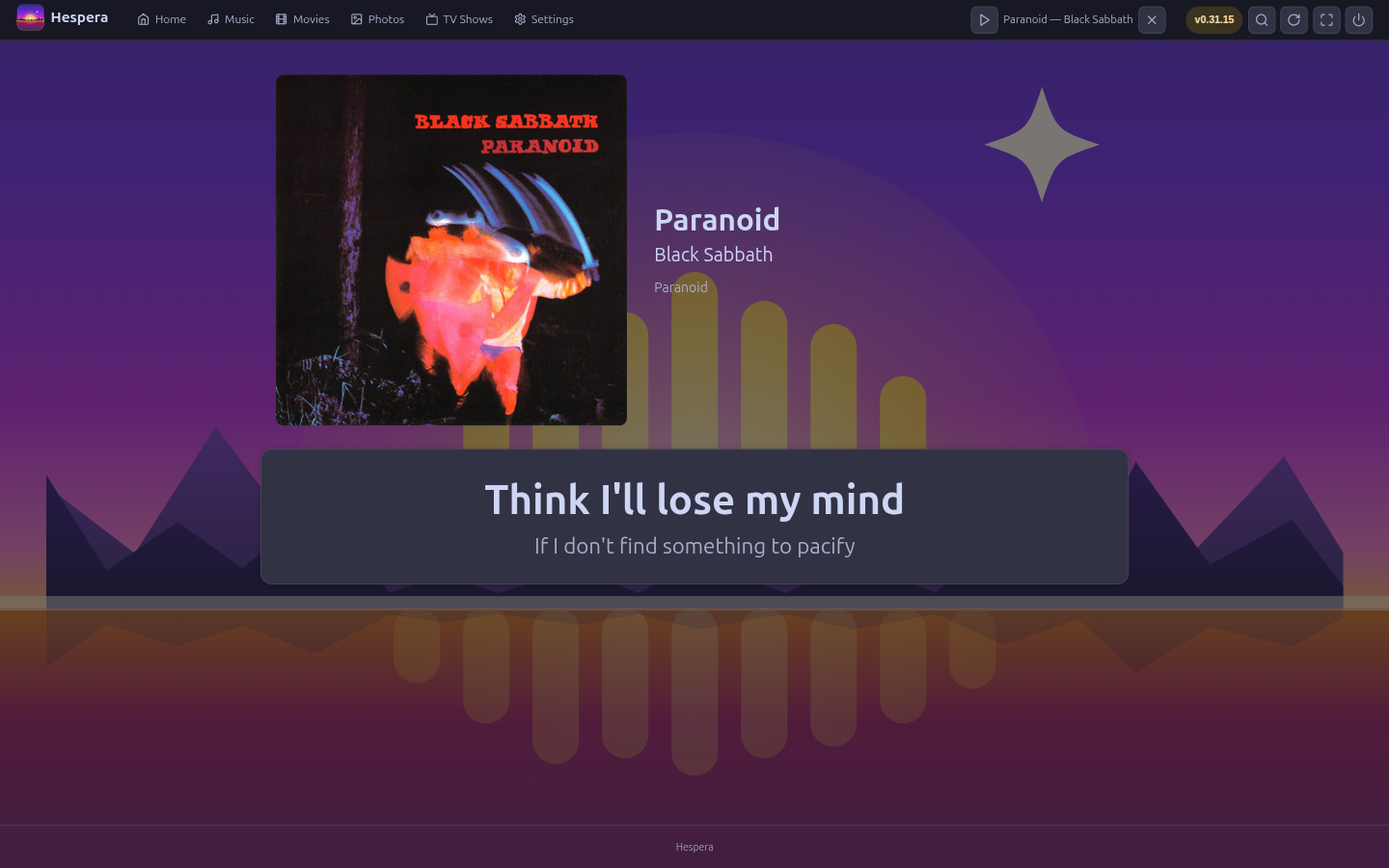
The now-playing bar survives navigation — browse artists and albums while the music plays on, with a queue, shuffle, and media-key support built in. Volume leveling evens out loudness across tracks, and the next song preloads for a near-gapless handoff.
Synced-lyrics karaoke
Line-by-line synced lyrics via LRCLIB — free, no API key — advance with the song over the full-screen dusk artwork. A per-song toggle keeps them out of the way when you don't want them.
Smart shuffle
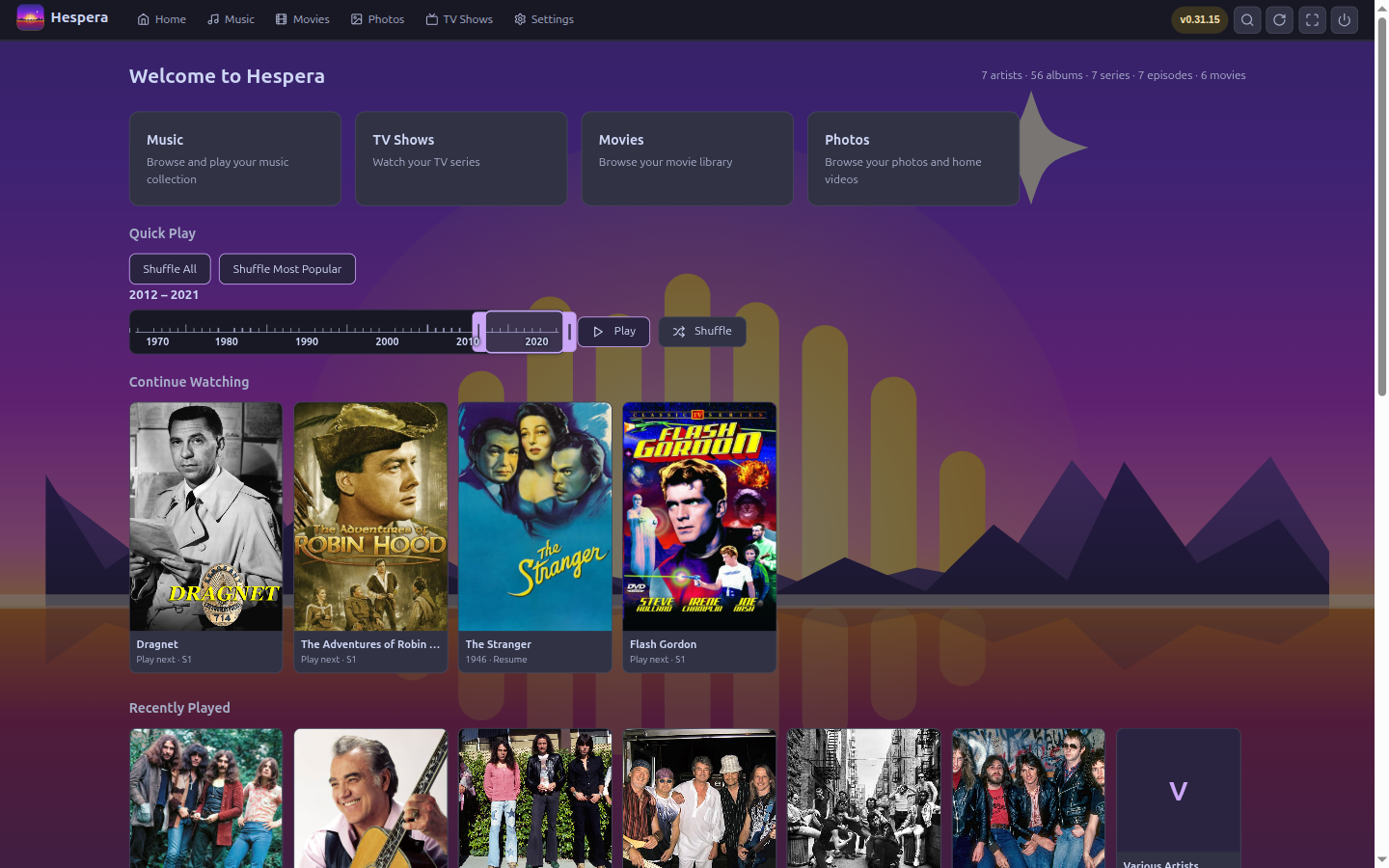
Shuffle All, Shuffle Most Popular — ranked by real listening data from ListenBrainz and Last.fm — or slide the Era dial to a decade and let it play.
Playlists & Instant Mix
Build playlists, reorder them from the couch, or save the queue you're enjoying as one. Instant Mix spins a station from any artist or track — similar artists drawn from your own library, weighted by ListenBrainz similarity. No cloud DJ involved.
TV & movies, played properly
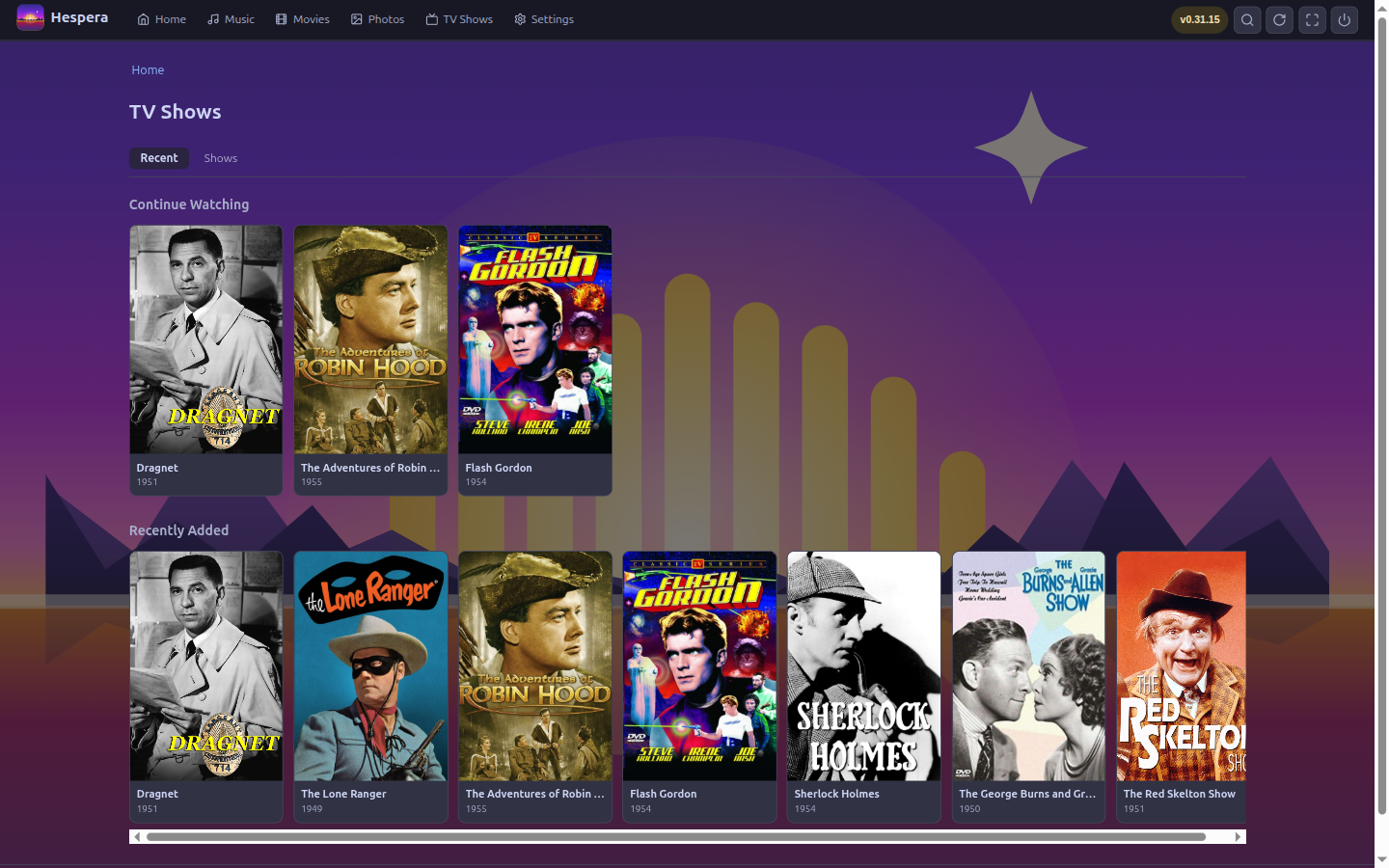
A per-device decision engine picks direct play, remux, or transcode; seekable on-demand HLS handles the rest. Resume where you left off, mark watched, change playback speed.
Subtitles, switched mid-scene
Changing text tracks is instant — no transcode restart, no rebuffer. Embedded tracks come out as WebVTT, bitmap subtitles get burned in, and anything missing is one OpenSubtitles search away, right in the player's subtitles menu. Size, position, and language defaults are yours to set.
Hear the dialogue
Dialogue boost flattens the whisper-then-explosion mix: dynamic-range compression in the player, plus a dialogue-forward 5.1 → stereo downmix when transcoding.
Skip the intro, mute the ads
Intros are found even without chapter markers — by audio fingerprint across a season — and a Skip button appears right on cue; an auto-skip toggle makes it hands-free. Commercials marked by chapters or .edl files can be skipped or auto-muted. Up Next rolls you into the next episode, across seasons, with a cancelable countdown.
People pages
Cast and crew for every show and film — bios, photos, filmography, with the titles you own linking straight into your library. Artists get the same: images and bios from Wikipedia, fanart.tv, and TheAudioDB.
More to explore
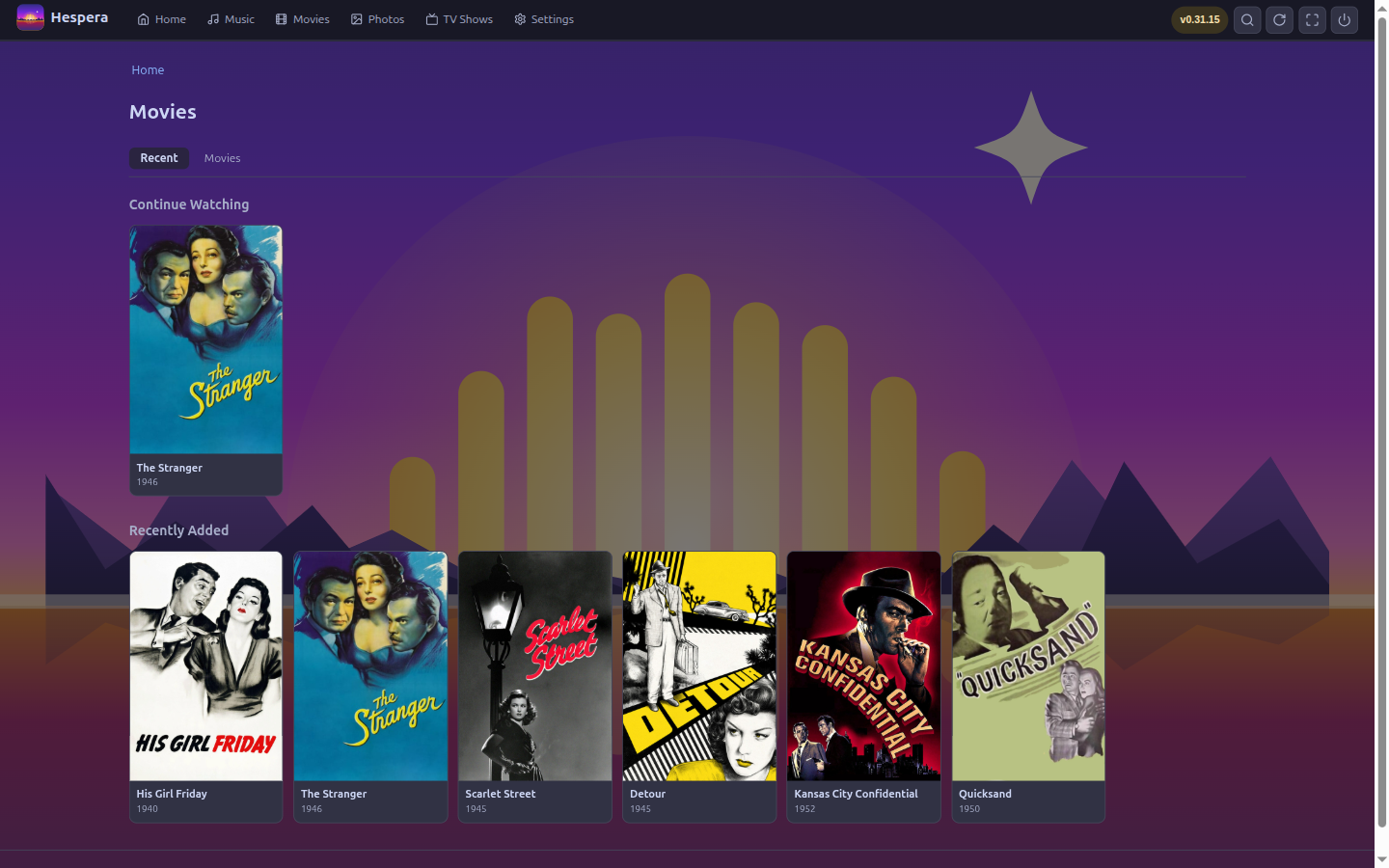
Movies show their franchise — every film in the collection, the ones you own linked locally — and shows and films alike get More Like This strips. Local featurettes, deleted scenes, and interviews surface as playable bonus content instead of clutter.
Integrity auto-repair
Every scan cheaply checks new files for corruption; fixable container damage is repaired with a lossless remux that's verified before it replaces anything. A deep bitstream check is one click away.
Photos, too
A fourth library for photos and home-video clips. Browse by date — real EXIF capture times — by folder, or just the videos; HEIC and TIFF display fine, orientation is honored, and clips play in the same player, with ⇤ ⇥ stepping through the day's footage.
Desktop to TV
One UI that reads the physical screen and scales itself — monitor, living-room TV, anything between — with full keyboard and remote navigation. A headless server mode is there when you want it on another box.
Fast in a way the cloud can't be
Streaming apps put a data center between you and the play button. Hespera doesn't: every click is a local database query and a page rendered on the spot, by a binary on your own disk. No spinner, no CDN handshake, no app phoning a mothership before it draws.
Pages in milliseconds
Server-rendered HTML straight from local SQLite — no client framework booting, no API waterfall. Browsing stays quick at absurd scale: a synthetic test library of 30,000 series and 50,000 movies still turns pages in about a second, and a real library is far under that.
Seek anywhere, instantly
Even when transcoding, the player knows the whole timeline up front — jumping to minute 90 costs one segment's encode, not a re-encode of the film. Hover for trickplay previews, or scan like a DVR at 2× / 8× / 32×; a scan costs nothing until you land.
Never interrupted
Subtitle switches swap mid-scene without touching the video. Library scans run at idle priority, so playback keeps the disk to itself. And / opens a jump palette that finds artists, songs, shows, movies, people — even characters — as fast as you type.
See it in action
A real app window on your machine — the home screen, the now-playing player with synced lyrics, and the TV and movie libraries.
Why Hespera
A single-machine app on a loopback port — not a network server. No account, no cloud, no telemetry; the site you're reading loads zero third-party fonts or trackers, and the app does the same.
AGPLv3, top to bottom. Read it, rebuild it, trust it. No subscription, no premium tier, no features held back — the whole app, for everyone, for free.
The UI, the database, the matcher — all embedded in one self-contained download. No Docker, no runtime, no background daemon. ffmpeg on your PATH is the only extra.
Launch it as a desktop app today; run it headless on the machine wired to the TV tomorrow. The same UI scales itself to the screen and drives fine from a remote.
How Hespera compares
Against the three best-known media servers. Legend: ✅ built in · 🟡 partial or limited · ❌ not available.
| Capability | Hespera | Plex | Jellyfin | Emby |
|---|---|---|---|---|
| Runs as a simple desktop app — no server setup | ✅ | ❌ | ❌ | ❌ |
| Single self-contained binary | ✅ | ❌ | ❌ | ❌ |
| No account required — ever | ✅ | ❌ | ✅ | 🟡 |
| Free & open source (AGPLv3) | ✅ | ❌ | ✅ | ❌ |
| Every feature free — no premium tier | ✅ | ❌ | ✅ | ❌ |
| Photos & home-video library | ✅ | ✅ | 🟡 | ✅ |
| Automatic metadata matching | ✅ | ✅ | ✅ | ✅ |
| Confidence-scored matches with a review queue | ✅ | 🟡 | 🟡 | 🟡 |
| Writes corrected tags into your music files | ✅ | ❌ | 🟡 | 🟡 |
| Synced-lyrics karaoke built in | ✅ | 🟡 | 🟡 | 🟡 |
| Popularity-aware & by-decade shuffle | ✅ | 🟡 | ❌ | ❌ |
| Direct play / remux / transcode decision engine | ✅ | ✅ | ✅ | ✅ |
| Skip intro & recap | ✅ | ✅ | 🟡 | 🟡 |
| Mute or skip marked commercials | ✅ | 🟡 | 🟡 | 🟡 |
| Dialogue-boost downmix | ✅ | 🟡 | ❌ | ❌ |
| Corruption detection & lossless auto-repair | ✅ | ❌ | ❌ | ❌ |
| One UI, desktop to TV, auto-scaled | ✅ | 🟡 | 🟡 | 🟡 |
| Works fully offline, no telemetry | ✅ | ❌ | ✅ | 🟡 |
| Apps for phones, tablets & smart TVs | ❌ | ✅ | ✅ | ✅ |
| Multi-user households & remote streaming | ❌ | ✅ | ✅ | ✅ |
| Price | 🟢 Free | 🟡 Free + Plex Pass | 🟢 Free | 🟡 Free + Premiere |
Plex, Jellyfin and Emby are mature media servers that do plenty Hespera doesn't aim to — apps for every phone and TV platform, multi-user households, streaming to you across the internet. This is about the jobs Hespera does cover, and how much less it asks of you to get there. Reach for a server when you're serving a household; reach for Hespera when it's your library, on your machine.
How it works
Hespera is one small Go program. Launch it and it opens a chromeless app window on a loopback port — a single-machine app, not a network server. Your library lives in SQLite; the interface is server-rendered HTML with vanilla JS, embedded in the binary. The only external tool is ffmpeg — it powers video playback, photo thumbnails, and the audio analysis. On Debian or Ubuntu, one script builds, packages, and installs it:
# build, package as a .deb, and install — with an app-menu entry
git clone https://github.com/daniel-alexander4/hespera && cd hespera
./install.sh

# then launch "Hespera" from your app menu — or:
hespera
Prefer it on the machine wired to the TV, or reachable from a browser? Run it headless and manage it from the command line:
# server mode: no window, just the app on a port
HESPERA_NO_BROWSER=1 hespera

# add a library, scan it, watch the jobs go by
hescli library add --name Music --type music --path ~/Music
hescli scan 1
hescli status
Download
One self-contained binary per platform — the whole UI is embedded, nothing to unpack or configure. Grab the build for your system, or find every platform, architecture, and past version on GitHub.
Linux
Debian & Ubuntu get a .deb that adds Hespera to your app menu and pulls in ffmpeg. Any other distro: the static hespera-…-linux-<arch> binary runs anywhere.
macOS
One self-contained binary for Intel (amd64) and Apple Silicon (arm64). Put ffmpeg on your PATH for video and photos: brew install ffmpeg.
Windows
A standalone hespera-…-windows-<arch>.exe for amd64 and arm64. For video and photos: winget install ffmpeg. Nothing else to install.
All platforms
On a different system, or want a specific architecture, checksum, or past version? Every build and the full source live on the project's GitHub page.
On Debian or Ubuntu, install the downloaded package — apt pulls in ffmpeg for you:
sudo apt install ./hespera_*.debPrefer to build from source? Go 1.23+ and one make target — Linux, macOS, or Windows:
git clone https://github.com/daniel-alexander4/hespera && cd hespera
make build
./bin/hespera
First run: add your Music, TV, Movies, and Photos libraries, point them at your folders, and Hespera scans, matches, and fills in the artwork — then keeps watching, so new files just appear. No account to create, nothing to configure, nothing phoning home.
Own your media library.
Free, open, and entirely yours — your collection, on your machine, for as long as you keep it.